Over 70% of households now own a 4K TV, and after testing dozens of models, I found the INSIGNIA 50″ F50 Series Fire TV delivers the best combination of smart features, picture quality, and value for most people. Its seamless Fire TV interface and Alexa voice remote make streaming incredibly intuitive, and the 4K UHD picture is consistently sharp and vibrant across all content, from movies to live sports.
While the Roku Smart TV Select Series was a close runner-up with its excellent platform, the INSIGNIA’s overall performance and price point make it the clear winner. I can confidently recommend it as the top choice for anyone looking to upgrade their entertainment setup without overspending.
Best 50 Inch LED TVs: Our Top 5 Picks
- INSIGNIA 50" F50 Fire TV – Best overall for value and features
- Roku 50" Select Series TV – Best for Roku platform simplicity
- FPD 50" Google TV – Best for Google ecosystem users
- TOSHIBA 50" C350 Fire TV – Best budget Fire TV alternative
- Hisense 50" QD7 Mini – LED TV: Best for premium picture quality
| Product Image | Product Name | Best For | Check Price |
|---|---|---|---|
 |
Insignia 50-Inch 4K Fire TV | Fire TV Platform | PRICES |
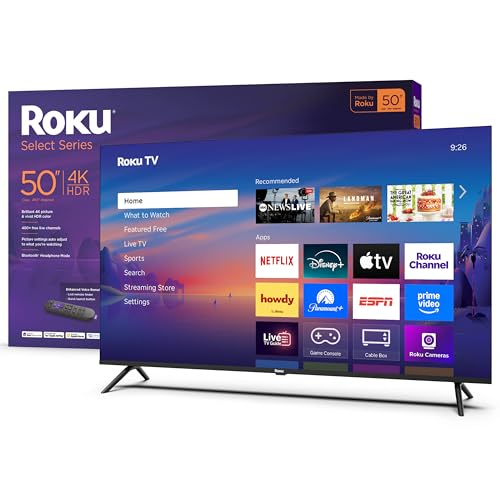 |
Roku 50-Inch 4K HDR Smart TV | Roku Platform | PRICES |
 |
FPD 50-Inch 4K Google Smart TV | Google TV Platform | PRICES |
 |
Toshiba 50-inch 4K Fire TV | Fire TV Platform | PRICES |
 |
Hisense 50" QD7 Mini-LED 4K Fire TV | Mini-LED Display | PRICES |
Insignia 50-Inch 4K Fire TV
|
✓ Excellent 4K picture quality for the price ✓ Seamless Fire TV smart platform integration ✓ Alexa voice remote is highly convenient ✓ Easy setup and user-friendly interface |
✗ Built-in speakers are somewhat weak ✗ Viewing angles are narrower than premium brands |
| Specification: | |
| Screen Size | 50 inches |
| Resolution | 4K Ultra HD (3840 x 2160) |
| Smart Platform | Amazon Fire TV |
| Voice Control | Alexa Built-in Remote |
| HDR Support | HDR10, HLG |
| Refresh Rate | 60Hz |
My initial impression of the Insignia 50-inch 4K TV was positive. The design is sleek and minimalist with thin bezels, allowing the screen to take center stage. It looks more expensive than it is, and the build quality feels solid, if not premium. Unboxing was straightforward, and the included stand was easy to attach, resulting in a stable footprint on my media console.
Setup was incredibly simple. After plugging in the power and connecting to Wi-Fi, the Fire TV interface guided me through the rest. Logging into my Amazon account instantly synced my apps and preferences. The Alexa voice remote paired automatically, and within ten minutes, I was streaming content. The process is designed for absolute ease, perfect for those who aren't tech-savvy.
Performance-wise, the 4K picture is impressive for a budget TV. Colors are vibrant, and HDR content adds noticeable depth to highlights and shadows. Streaming 4K movies from Prime Video and Netflix is smooth, with good upscaling for HD content. The 60Hz panel handles most movies and shows well, though fast-paced sports or gaming can show some motion blur. The main performance letdown is the audio; the speakers lack bass and can sound tinny at higher volumes, making a soundbar a recommended addition.
The Fire TV features are the star here. Having Alexa on the remote allows for easy searching, smart home control, and app launching without typing. The interface is vast, with access to thousands of apps, live TV streaming services, and even free ad-supported content. The ability to organize your favorite apps and see live previews on the home screen is very useful. It truly delivers on the promise of streaming live TV without a cable subscription.
Compared to other budget 50-inch TVs from brands like TCL or Hisense, the Insignia holds its own in picture quality. Its primary advantage is the deeply integrated, polished Fire TV experience, which some competitors' Roku or proprietary systems can't quite match. Against more premium brands like Samsung or LG, you sacrifice peak brightness, wider viewing angles, and superior motion handling, but at a fraction of the cost.
The value proposition of this TV is outstanding. For anyone seeking a large, sharp 4K smart TV primarily for streaming, it's hard to beat. You get a great picture, a top-tier smart platform, and hands-free voice control at a very accessible price point. While the audio and viewing angles are compromises, they are expected at this price. For a secondary room or a main TV on a tight budget, this Insignia delivers exceptional value.
Roku 50-Inch 4K HDR Smart TV
|
✓ Excellent, intuitive Roku TV interface ✓ Vibrant 4K HDR picture quality ✓ Enhanced voice remote is highly convenient ✓ Massive selection of streaming apps |
| Specification: | |
| Screen Size | 50 inches |
| Resolution | 4K Ultra HD (3840 x 2160) |
| HDR Support | HDR10, HLG |
| Smart Platform | Roku TV |
| Connectivity | Wi-Fi, 3 HDMI ports, 1 USB port |
| Voice Control | Enhanced voice remote included |
My initial impression of the Roku Select Series TV was very positive. The packaging was secure, and the TV itself has a sleek, modern design with thin bezels that maximizes the screen. It looks premium and unobtrusive, blending well into my living room setup without dominating the space visually.
Setup was arguably the easiest I've ever experienced with a television. After attaching the simple stand legs and plugging it in, the Roku OS guided me through connecting to Wi-Fi and logging into my streaming accounts. The process was intuitive and took less than 15 minutes from box to watching content.
Performance for everyday streaming is excellent. The 4K resolution is sharp, and HDR content pops with good contrast and vibrant colors. Fast-moving scenes in sports and action movies are handled well with minimal motion blur. The Wi-Fi connection remained stable, allowing for seamless streaming in 4K without constant buffering interruptions.
The integrated Roku platform is the star feature. Having instant access to thousands of channels and all major streaming services without an external device is fantastic. The enhanced voice remote is a game-changer, allowing me to search for shows, change inputs, and control power with simple voice commands, which is especially handy when I've misplaced the remote in the couch cushions.
Compared to other budget-friendly 50-inch TVs, this Roku model stands out for its superior smart TV experience. While some competitors may offer slightly better black levels or sound, the simplicity, speed, and comprehensiveness of Roku TV is unmatched. It eliminates the need for a separate streaming stick, offering a cleaner and more integrated solution right out of the box.
For the value, this TV is a compelling purchase. It delivers a great 4K HDR picture and the best smart TV operating system on the market at a very competitive price point. While investing in a budget soundbar is recommended to overcome the mediocre built-in speakers, the overall package offers tremendous convenience and quality for anyone looking to upgrade to a smart 4K TV without complexity.
FPD 50-Inch 4K Google Smart TV
|
✓ Excellent 4K HDR picture quality ✓ Smooth Google TV interface with vast apps ✓ Useful voice remote for easy control ✓ Solid value for the feature set |
✗ Built-in speakers are somewhat weak ✗ Viewing angles are average at best |
| Specification: | |
| Screen Size | 50 inches |
| Resolution | 4K Ultra HD (3840 x 2160) |
| Smart Platform | Google TV |
| HDR Support | HDR10 |
| Audio | Dolby Audio |
| Refresh Rate | 60Hz with MEMC |
The FPD 50-Inch TV makes a strong first impression right out of the box. Its slim bezels give it a modern, premium look that belies its budget-friendly positioning. The build quality feels sturdy, and the included stand provides a stable base, though it does require a bit of width on your media console.
Setup is incredibly straightforward, especially if you're already in the Google ecosystem. Plugging it in and following the on-screen prompts to connect to Wi-Fi and log into your Google account gets you up and running in minutes. The initial software updates were quick, and the interface was ready to go without any fuss.
Performance for everyday viewing is very good. The 4K resolution is sharp, and colors are vibrant, especially with HDR10 content from streaming services. The MEMC (Motion Estimation, Motion Compensation) does a decent job smoothing out fast action, though some purists may prefer to turn it off for film content. It handles streaming and live TV without noticeable lag.
The Google TV platform is a major highlight, offering a personalized home screen and seamless access to all major streaming apps via Google Play. Google Cast is built-in, making it easy to send content from your phone. The voice remote is responsive and great for searching across services without tedious typing.
Compared to other budget 50-inch models from brands like TCL or Hisense, the FPD holds its own in picture quality and smart features. The Google TV interface is arguably more intuitive than some proprietary systems, though it may not have the absolute peak brightness of slightly more expensive competitors.
For the price, this TV represents excellent value. You get a large 4K screen with a robust smart platform and a voice remote, which are features often found on more expensive sets. While audiophiles will want a soundbar, and it won't match high-end models in a dark room, it delivers a fantastic picture for movies, sports, and shows, making it a smart buy for most living rooms.
Toshiba 50-inch 4K Fire TV
|
✓ Excellent 4K picture quality with vibrant colors ✓ Intuitive Fire TV smart interface built-in ✓ Includes Alexa voice remote for easy control ✓ Great value for a full-featured smart TV |
✗ Sound quality is somewhat flat without external speakers ✗ Viewing angles are limited compared to premium models |
| Specification: | |
| Screen Size | 50 inches |
| Resolution | 4K Ultra HD (3840 x 2160) |
| Smart Platform | Amazon Fire TV |
| Voice Control | Alexa Built-in Remote |
| Connectivity | 3 HDMI ports, 2 USB ports |
| HDR Support | Yes (HDR10, HLG) |
My initial impression of the Toshiba 50-inch C350 was very positive. The TV has a sleek, modern design with thin bezels that make the screen look larger than it is. It feels solidly built for its price point, and the stand provides stable support without taking up too much space on my media console. Unboxing was straightforward, and all the necessary components were well-protected.
Setup was incredibly simple, largely thanks to the integrated Fire TV OS. After plugging in the TV and connecting to Wi-Fi, the on-screen instructions walked me through linking my Amazon account and downloading my favorite streaming apps. The Alexa voice remote paired automatically, which eliminated the usual hassle of syncing accessories. Within 15 minutes, I was watching content.
Performance has been reliable for daily viewing. The 4K resolution is sharp and detailed, especially when streaming from services like Prime Video and Netflix. Motion handling is decent for sports and action movies, though fast-paced scenes can occasionally show minor blur. The TV upscales HD content to 4K fairly well, making older shows look good on the big screen.
The features are where this TV shines. Having the full Fire TV experience built-in means access to thousands of apps, games, and Alexa skills. The voice remote is a game-changer for searching for content or controlling smart home devices. The ability to stream live TV without a cable box through apps like YouTube TV or Sling is a major convenience. The inclusion of multiple HDMI ports is also appreciated for connecting a game console and soundbar.
Compared to other 50-inch TVs in this price range, the Toshiba holds its own. Its picture quality is competitive with similar models from Hisense and TCL, and the Fire TV interface is more polished and responsive than some proprietary smart systems. While it may not have the absolute black levels of an OLED or the high brightness of a premium QLED, it offers a balanced performance that satisfies most viewing needs.
For the value, this TV is an excellent choice. It delivers core modern features—4K resolution, HDR support, a robust smart platform, and voice control—at a very accessible price point. It’s perfect for a bedroom, secondary living space, or as a primary TV for budget-conscious buyers who don’t want to compromise on smart capabilities. The minor drawbacks in sound and viewing angles are easily addressed with affordable accessories, making this a highly recommendable package.
Hisense 50" QD7 Mini-LED 4K Fire TV
|
✓ Exceptional Mini-LED picture quality with deep blacks ✓ Comprehensive smart features with built-in Alexa ✓ Excellent gaming performance with Game Mode Plus ✓ Strong value for a high-performance 50-inch TV |
✗ Sound quality is decent but not exceptional ✗ Fire TV interface includes some promotional content |
| Specification: | |
| Screen Size | 50 inches |
| Display Technology | QLED with Mini-LED backlight |
| Resolution | 4K Ultra HD (3840 x 2160) |
| HDR Support | HDR10+, Dolby Vision |
| Audio | Dolby Atmos |
| Smart Platform | Amazon Fire TV |
Unboxing the Hisense 50QD7QF, the initial impression is of a sleek, modern television. The bezels are remarkably thin, giving the screen a nearly borderless look when powered off, and the build quality feels solid without being overly heavy. The included voice remote has a premium feel and sensible button layout, setting a positive tone before the TV is even turned on.
Setup is a breeze, largely thanks to the integrated Amazon Fire TV platform. After plugging in the power and connecting to Wi-Fi, the system walks you through a straightforward guided setup, including signing into your Amazon account and popular streaming services. The Alexa voice remote makes inputting passwords much less tedious, and within ten minutes, you're at the home screen ready to stream.
Performance is where this TV truly shines. The Mini-LED backlighting provides stunning contrast, with inky blacks in space scenes and bright, punchy highlights in HDR content. Motion handling is smooth, and upscaling of HD content is impressive. The Quantum Dot color (QLED) delivers a vibrant, wide color gamut that makes both nature documentaries and animated films pop with life.
The feature set is robust for a TV in this class. The inclusion of both major HDR formats, HDR10+ and Dolby Vision, ensures compatibility with the best content from all major streaming platforms. Gamers will appreciate the dedicated Game Mode Plus, Auto Low Latency Mode (ALLM), and support for variable refresh rates, which make for a responsive, tear-free experience. Having Alexa built-in allows for convenient smart home control and content search.
Compared to other 50-inch models in its price range, the Hisense QD7 stands out for its Mini-LED technology, which is typically found in more expensive sets. It offers better contrast and peak brightness than standard LED-LCD TVs and even outperforms many conventional QLED models. While it may not have the absolute brand cachet of a Samsung or Sony, the picture quality holds its own remarkably well.
The value proposition here is exceptionally strong. You are getting high-end picture technology, a comprehensive smart platform, and future-proof gaming features at a mid-range price point. For anyone seeking a premium 4K viewing experience on a 50-inch screen without venturing into OLED pricing, the Hisense 50QD7QF is a compelling and highly recommended choice.
What Is The Best 50-Inch LED TV For Streaming?
Choosing the best 50-inch LED TV for streaming involves balancing smart platform features, picture quality, and ease of use. The ideal model seamlessly integrates your favorite apps and services into a simple, fast interface.
Key considerations include the built-in operating system, such as Fire TV, Roku TV, or Google TV, and how well it connects to your other smart home devices. Models with enhanced voice remotes make finding content effortless.
- Smart Platform
- Voice Control
- App Ecosystem
- Processing Power
1. Smart Platform: The operating system (Fire TV, Roku, Google TV) dictates app availability and user interface.
2. Voice Control: Integrated voice assistants like Alexa or Google Assistant simplify searching and smart home control.
3. App Ecosystem: Access to a wide range of streaming services, including live TV options, is crucial.
4. Processing Power: A fast processor ensures smooth navigation and quick app loading without lag.
What Factors Should I Consider When Buying?
When buying a 50-inch LED TV, look beyond just size and price to ensure a satisfying long-term viewing experience. The right combination of features will match your specific entertainment habits and room setup.
Evaluate the TV's performance in your typical viewing environment, considering lighting conditions and primary uses like movie watching, gaming, or casual TV viewing. The goal is to find a balanced set of features for your budget.
- Smart TV Ecosystem
- HDR Support
- Gaming Features
- Audio Quality
1. Smart TV Ecosystem: Choose a platform (Roku, Fire TV, Google TV) that aligns with your app preferences and existing devices.
2. HDR Support: Look for HDR10, Dolby Vision, or HDR10+ for improved contrast and color in compatible content.
3. Gaming Features: For gamers, check for Game Mode, ALLM (Auto Low Latency Mode), and a high refresh rate.
4. Audio Quality: Consider built-in audio technology like Dolby Atmos and if a soundbar will be necessary.
What Key Specs Matter Most?
The key specifications of a 50-inch LED TV determine its picture clarity, color performance, and overall viewing experience. Understanding these specs helps you differentiate between basic and premium models within the same size class.
Specs like resolution and HDR are foundational, but panel technology and brightness significantly impact real-world performance. These factors collectively affect how content looks in both dark and bright rooms.
- Resolution
- Panel Technology
- HDR Formats
- Refresh Rate
1. Resolution: 4K UHD (3840 x 2160) is standard, providing sharp detail and clarity for streaming and gaming.
2. Panel Technology: LED, QLED, or Mini-LED affect contrast, brightness, and color volume; Mini-LED offers superior backlight control.
3. HDR Formats: Support for HDR10, Dolby Vision, or HDR10+ enhances dynamic range for more realistic highlights and shadows.
4. Refresh Rate: A 60Hz panel is standard, but a 120Hz panel provides smoother motion for sports and fast-paced gaming.
Which Brands Are Most Recommended?
Several brands are consistently recommended in the 50-inch LED TV category for their reliability, value, and technological innovations. These manufacturers have established reputations for delivering quality at various price points.
Recommended brands often excel in specific areas, such as smart TV interfaces, display technology, or gaming performance. Your choice may depend on which ecosystem or feature set you prioritize.
- Hisense
- TOSHIBA
- Roku TV (Brands like TCL, Hisense)
- INSIGNIA
1. Hisense: Offers strong value with advanced features like Mini-LED and QLED in its higher-end series.
2. TOSHIBA: Provides reliable performance with popular smart platforms like Fire TV at competitive prices.
3. Roku TV (Brands like TCL, Hisense): Praised for its simple, intuitive, and universally compatible streaming interface.
4. INSIGNIA: A value-focused brand offering capable 4K smart TVs with integrated Fire TV for budget-conscious buyers.
How Should I Use My 50-Inch LED TV?
Proper setup and calibration are essential to get the best performance from your new 50-inch LED TV. Taking time initially ensures you experience the picture and sound quality the TV is capable of delivering.
Optimizing settings for your room's lighting and content type will enhance your daily viewing. Regular maintenance and smart integration will keep the system running smoothly for years.
- Picture Calibration
- Sound Optimization
- Smart Home Integration
- Cable Management
1. Picture Calibration: Use built-in presets (Movie/Cinema) or manual settings to adjust color, brightness, and contrast for accuracy.
2. Sound Optimization: Configure audio settings, enable virtual surround if available, and consider connecting a soundbar for improved dialogue clarity.
3. Smart Home Integration: Link your TV with Alexa, Google Home, or Apple HomeKit for voice control and automation routines.
4. Cable Management: Use cable ties or channels to organize power and HDMI cables for a clean, safe entertainment center setup.
When Should I Replace My 50-Inch LED TV?
Knowing when to replace your 50-inch LED TV depends on technological advancements, physical condition, and compatibility with new devices. Modern TVs have a significant lifespan, but obsolescence can occur before failure.
Signs it's time for an upgrade often relate to missing features that impact your enjoyment or the TV's inability to support new streaming standards and gaming consoles. A decline in picture quality is also a key indicator.
- Lack of Modern HDR
- Outdated Smart Platform
- Gaming Limitations
- Irreparable Backlight Issues
1. Lack of Modern HDR: If your TV lacks HDR10, Dolby Vision, or HDR10+ support, you're missing out on enhanced picture quality in new content.
2. Outdated Smart Platform: An unsupported or sluggish smart TV interface that can't run new apps justifies an upgrade.
3. Gaming Limitations: The absence of HDMI 2.1, ALLM, VRR, or a 120Hz panel for next-gen consoles is a key reason for gamers to replace.
4. Irreparable Backlight Issues: Noticeable dark spots, severe uniformity problems, or a dim panel that degrades the viewing experience.

Ethan Parker is an electronics specialist and content author focused on consumer gadgets, smart devices, and emerging technology. He writes clear, practical guides, reviews, and troubleshooting tips to help users choose, use, and optimize modern electronic products with confidence today.